
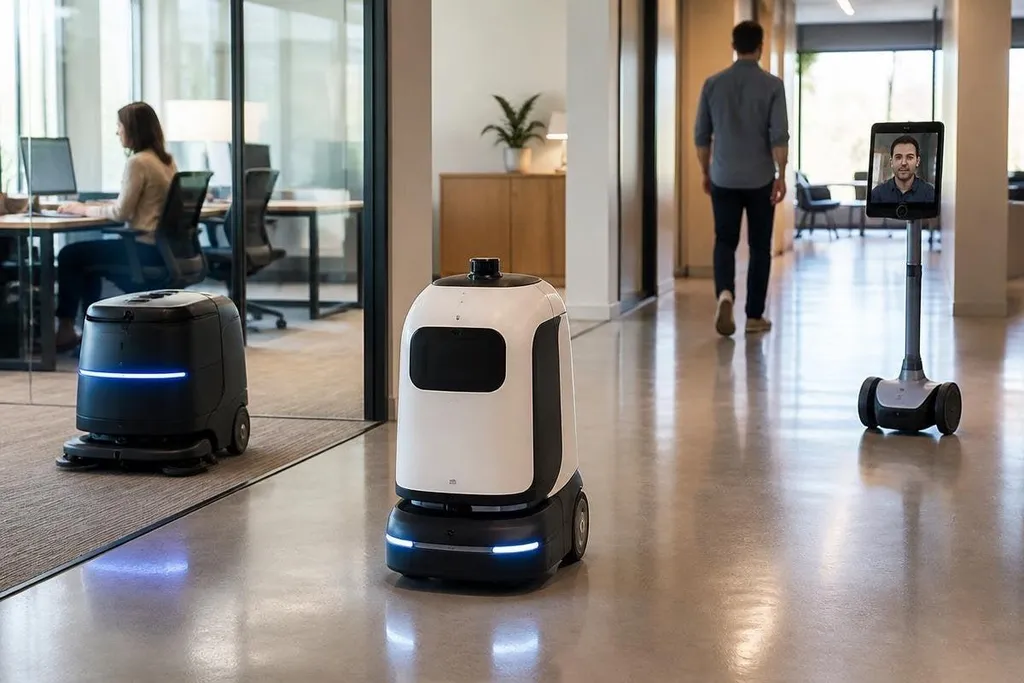
An office robot may clean floors at night, carry supplies between rooms, or let a remote worker join a meeting through a moving screen. The useful question for a facilities manager is where a robot removes repeated work without creating a new safety, privacy, or support problem.
Quick read
- Best fit: repeated tasks with clear routes and simple success checks
- Main risks: blocked walkways, recorded data, weak access controls, and repair delays
- Buying test: measure the task before choosing the robot
Where office robots help
Cleaning robots can follow mapped routes across open floor areas. A delivery robot can move files, food, or small supplies between fixed points. A telepresence robot can give a remote worker a camera, screen, microphone, and motorized base so they can move through the office from another location.
These tasks share a useful trait: the work repeats. A robot can take over a route that staff already understand, while people handle exceptions, visitors, fragile items, and work that needs judgment. That split can reduce routine trips and leave staff more time for tasks that need direct contact.
The gain depends on the site. A cleaning robot needs clear floor space, safe charging, and doors it can use. A delivery robot needs a route that stays open and a way to confirm the right person receives the item. If those conditions are missing, the robot spends its time waiting for help.
What a robot changes for staff
A robot changes the work around a task, not only the task itself. Someone must set its route, check alerts, refill supplies when needed, and report faults. A facilities team also needs a plan for visitors, lifts, locked doors, and fire exits.
That work can be small when the robot has one route and one job. It grows when the office has several floors, changing room layouts, or shared doors. A machine that looks useful in a quiet demonstration may need regular staff help in a busy office.
The work left around the robot can matter more than the task it completes. A manager should compare the route, staff handoff, failure record, and time saved, using Robot 24 reports alongside the maker’s claims. That record also needs to show what doors, cameras, microphones, and employee data the robot can reach.
Privacy and safety risks
Cameras, microphones, maps, and access records can make an office robot useful. They can also collect information about rooms, staff movement, meetings, and visitors. Before a trial, decide what data the robot collects, where it is stored, who can view it, and when it is deleted.
Physical safety needs the same care. A moving robot can meet a person, chair, box, or open door. Its sensors may slow it down, stop it, or ask for remote help, but the office still needs clear rules for walkways and charging areas. Test the robot near people with different walking speeds and mobility needs.
Cybersecurity adds another risk. A connected robot may use an office network, cloud service, mobile app, or remote control channel. Give it only the network access it needs, change default passwords, limit remote control, and keep a record of software updates.
Cost and work limits
The purchase price is only one part of the cost. Add installation, mapping, training, charging space, service visits, replacement parts, software fees, and staff time. Ask the supplier which repairs the office can handle and which repairs require a technician.
A robot can also change jobs in ways that need open discussion. Staff may lose a repeated task, gain monitoring work, or need training for a new role. A clear plan is better than presenting the robot as a silent replacement for people who already know the building.
I’d start with one narrow task and a short trial, then keep the robot only if the measured time saved exceeds the support work it creates.
A practical buying checklist
Use these checks before signing a contract:
- Record the baseline. Time the current task across busy and quiet days.
- Map the route. Mark doors, lifts, stairs, visitors’ areas, and emergency exits.
- Check the data. Ask about cameras, microphones, storage, access, and deletion.
- Test failure recovery. Block the route and see how staff restart the task.
- Price the service plan. Include parts, software fees, training, and response times.
- Name the owner. Assign one team to handle alerts, updates, and daily checks.
The trial should end with a measured result, not a general impression. If the robot needs frequent help or gathers more data than the task requires, keep the manual process. If it completes a repeat route with few stops and a clear support load, expand one area at a time.